Kloxo is a free, open-source web hosting control panel used to manage web hosting servers. I personally used this for some projects.
If you don't know, Kloxo was formerly known as Lxadmin.
2. Root SSH access
3. Valid hostname such as linux.server.com
Download Kloxo and execute:
After installation, open https : //your-server-ip:7777 in your web browser. Non-SSL port is 7778
Default username and password is admin.
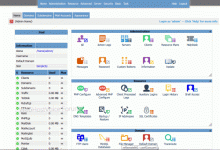
Installation of Kloxo took only 10 minutes.
If you don't know, Kloxo was formerly known as Lxadmin.
Requirements
1. AlmaLinux 9, Rocky 9 or RHEL 9 related OS.2. Root SSH access
3. Valid hostname such as linux.server.com
Download Kloxo and execute:
Bash:
curl -O https://kloxo.org/kloxo8/kloxo.sh
sh kloxo.sh
After installation, open https : //your-server-ip:7777 in your web browser. Non-SSL port is 7778
Default username and password is admin.
Installation of Kloxo took only 10 minutes.